Issues
Introduction
What is the Issues Tab? The Issues tab in the Portfolio functionality of Fortes Change Cloud is a centralized space for identifying, logging, and managing portfolio level issues that impact the successful delivery of portfolio elements. It provides a structured way to capture problems, assign ownership, track resolution progress, and assess the potential impact on strategic objectives, programs, or projects. This tab ensures that issues are not only documented but also actively managed and escalated when necessary, helping organizations maintain control over risks and disruptions.
Who Uses It? The Issues tab is used by various roles involved in portfolio execution and oversight, including:
- Portfolio Managers, to monitor critical issues across the portfolio and ensure timely resolution.
- Program and Project Managers, to log and manage issues out of their scope and escalate when needed.
- PMO Teams, to oversee issue trends, support governance, and ensure consistent issue management practices.
- Executives and Sponsors, to stay informed about high-impact issues that may require strategic intervention.
What Value Does It Deliver? The Issues tab delivers value by:
- Improving Risk Awareness: Provides visibility into issues that could threaten the success of strategic initiatives.
- Supporting Proactive Management: Enables early identification and resolution of issues before they escalate.
- Enhancing Accountability: Assigns clear ownership and deadlines for issue resolution, promoting follow-through.
- Facilitating Governance: Ensures that issue management is consistent, traceable, and aligned with portfolio governance standards.
Working with issues
Track the issues of a portfolio in the Issues tab or the Portfolio app in Fortes Change Cloud. Not only is it easy to keep track of all issues in the same place, it is also useful to keep track of where all other relevant information about the portfolio is.
This article answers the following questions:
- What is the purpose of the issues tab in the Portfolio?
- How do I use the issues tab?
What is the purpose of the issues tab in the Portfolio?
The Issues tab in the Portfolio allows you to document all issues that come up within a portfolio. In addition, it offers the possibility to keep track of all relevant information about the issues, for example the type of issue, the status of the issue, and the date that the issue was created. The list of issues can also be exported to a spreadsheet program, so that the issues can easily be shared with people who do not have access to Fortes Change Cloud. Issues can easily be tracked and displayed in a well-arranged manner in this tab.
How to use the issues tab?
-
Decide which information you want to document and add the information as columns by clicking columns and selecting the desired columns. These are columns that provide more information about the issues. You could, for example, choose to add the column Last edited on to display the date the issue was last edited. Example of the columns:
- Type displays the type of the issue. This information can be used to decide the next step.
- Status indicates if an issue is solved or not.
- Owner enables the possibility to appoint a person to an issue.
-
Add an issue by clicking +. Enter a description and fill in the remaining columns.
-
If needed, use a filter to filter the issues. Using a filter creates more insight, because it can be used to show only the relevant issues at that moment. You could also opt to use a view if you want to re-use a filter or set of filters.
-
Export the issues to a spreadsheet program to share them or to send them to people that don’t have access to Fortes Change Cloud.
Relation to project issues
Like risks, a portfolio's Issues tab and a project's Issues tab are separate registers. An issue reported from a project becomes visible to the portfolio (for example in reports and dashboards), but is not merged into the portfolio's own Issues tab. See Relation to project risks for a full explanation. The same separation between reporting and merging applies to issues.
Customizable detail page of log items
It is now possible to configure the detail page of log items according to your needs. This is true in the Portfolio for the Issues and Risks tabs.
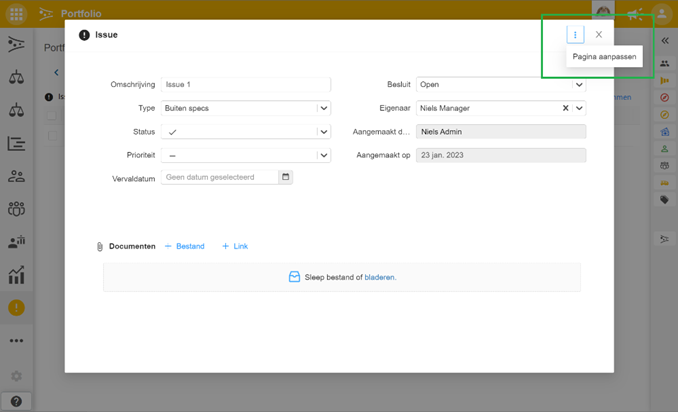
If you go to the detail page of a log item, there is now a menu button with the Adjust page option. You will then enter the canvas’s configuration mode and you can change the default layout. This feature is only available for administrator, manager, and support roles.
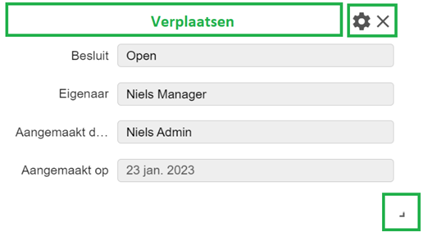
The settings button of a segment allows you to adjust the segment. The cross allows you to discard the segment. The “+ add segment” button at the bottom of the canvas allows you to add a new segment. Segments can be moved on the page by clicking on the segment header and then dragging the mouse. A segment can be made larger or smaller at the corner of a segment.
The Reset to Default button restores the default setup.
On the detail page of a log item, 4 segment types can be added:
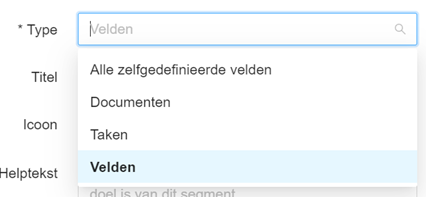
- Fields: self-selectable fields.
- All self-defined fields: contains all self-defined fields of the given log item.
- Tasks: tasks can be added to the log item.
- Documents: documents can be added to the log item.
The field segment is the only segment that can be added multiple times on a canvas.
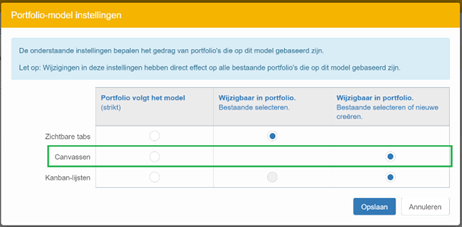
A custom detail page can be set up for each log item type. The modified detail page is only available in the portfolio where you made the modification. If you want to roll out custom detail pages across multiple/all portfolios, you can do so using portfolio models.
When you customize detail pages in a model, all derived portfolios and projects will have these custom pages. In the model, you can further set whether strictly following the model or allowing deviation on a portfolio-by-portfolio basis.
Best practices
- Use columns and filters to make the overview clear and manageable.
- Regularly update and review issues to keep the list relevant and actionable.
- Configure the detail page to match your workflow and only show the information that matters to your team.
- Export issues when you need to share information outside Fortes Change Cloud.
FAQ
Can I share the list of issues with people outside Fortes Change Cloud?
Yes, you can export the issues list to a spreadsheet program for sharing.
Can I customise the detail page for issues?
Yes, administrators, managers, and support roles can adjust the layout of the detail page for log items in the Issues and Risks tabs.
Can I use filters to focus on specific issues?
Yes, filters and views help you display only the issues relevant to your needs.
Are custom detail pages available in all portfolios?
A custom detail page is only available in the portfolio where you made the modification, unless you use portfolio models to roll them out more widely.
More support?
For step-by-step instructions or troubleshooting, contact your Fortes Change Cloud administrator or consult in-app help.