AI Assistant
Introduction
What is the AI Assistant? The AI Assistant lets you ask questions about your portfolio in a chat panel within the Portfolio app. You type a question, the assistant analyses your portfolio data, and it answers directly in the chat.
The AI Assistant is an experimental feature. AI-generated content may be incorrect, so always verify the responses before you act on them.
Who uses it? Portfolio managers, PMO teams, and other portfolio users who want a quick, text-based insight into their portfolio without building an overview or report first.
What value does it deliver?
- Gives fast answers to questions about your portfolio, its items, and how they relate to your strategy.
- Keeps you in control: the assistant only analyses your data when you send a message.
- Leaves your portfolio untouched: all answers appear in the chat only.
The AI Assistant is off by default. It is only switched on for your environment at your organisation's request. When it is off, the assistant and its configuration are not shown. See Availability and setup.
Availability and setup
The AI Assistant works on a Bring Your Own LLM basis. Fortes does not supply a language model. Your organisation connects its own model, running in its own Azure subscription.
- Your own Azure OpenAI. Your organisation creates an Azure OpenAI resource in its own Azure subscription and chooses the region and the model. Your organisation manages the keys, and its quota is the usage limit.
- Fortes provides the connection. Fortes connects Fortes Change Cloud to your Azure OpenAI resource and configures the assistant for your environment.
- Off until you ask. The assistant stays off until your organisation asks Fortes to switch it on. It can be switched on or off for the whole environment.
To connect your model, Fortes needs the following details of your Azure OpenAI resource:
- The endpoint URL
- An API key
- The deployment name
- The API version
- Optionally, the model name
Contact your Fortes consultant to arrange this, and agree on a secure way to share the API key. Never send API keys by email.
Open the AI Assistant
- Open a portfolio in the Portfolio app.
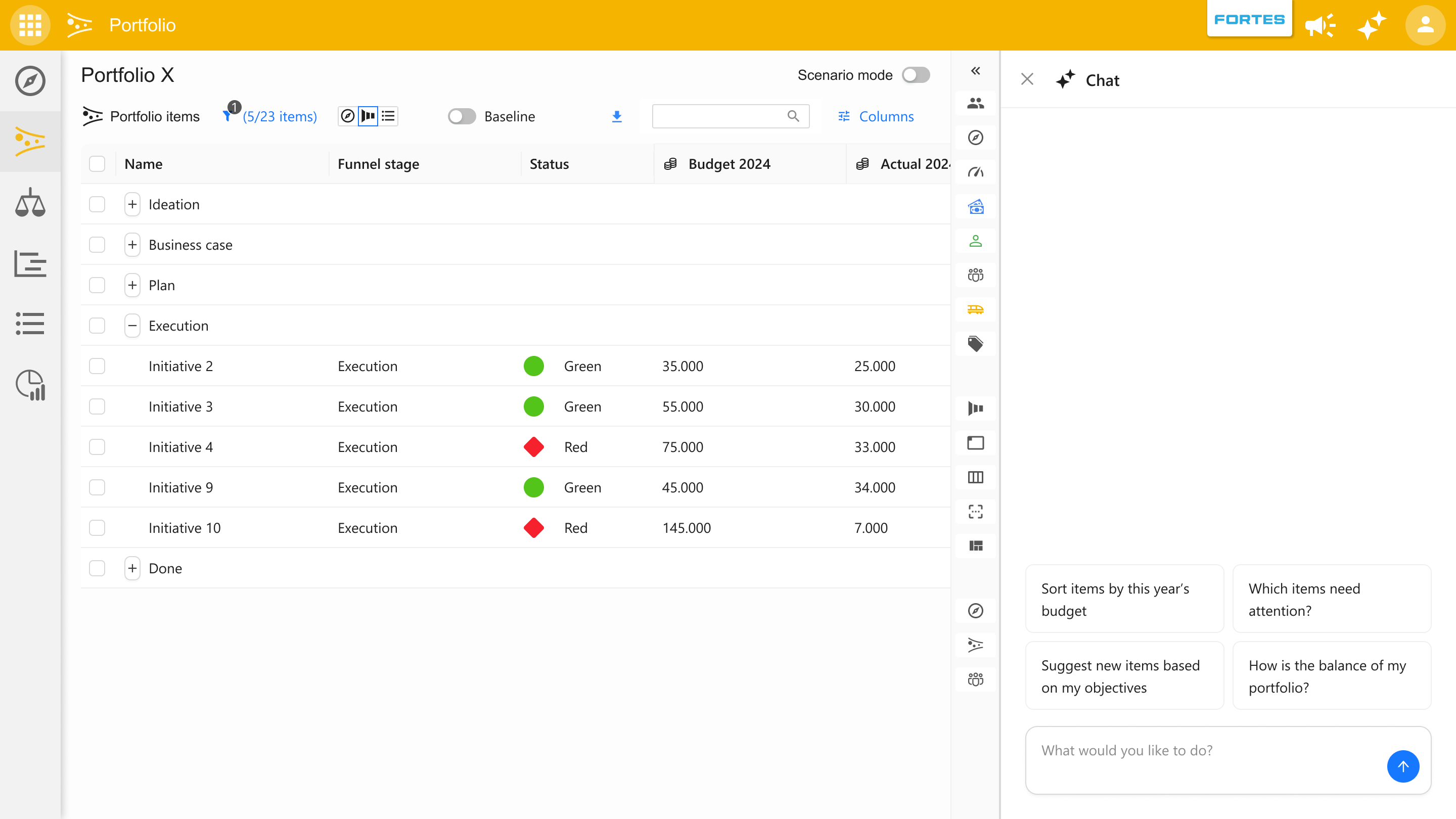
- Click the AI Assistant icon (the sparkle icon) in the top header bar. The Chat panel opens on the right side of the screen.
- Type your question in the input field, or select one of the suggested questions, and send it.
The assistant responds in the chat. Click the x at the top of the panel to close it.
Ask questions about your portfolio
The assistant understands the objects you work with in Strategic Portfolio Management, including:
- Portfolios
- Portfolio items
- Strategies, Perspectives, and Objectives
This lets you ask for things like an overview of your portfolio, or how your portfolio relates to your strategy and Objectives. You receive a concise, text-based answer.
The assistant is aware of your current context, such as the app, the page you are on, and the object you are viewing, and refers to that context in plain language.
How the assistant handles your data
- Only on request. The assistant analyses your data only when you send a message. Nothing is analysed proactively or in the background.
- Within your scope and permissions. The assistant respects the current portfolio scope, unless you explicitly ask otherwise, and only uses data you are authorised to see.
- Answers in the chat only. Results are shown as chat messages. The portfolio list and the rest of the interface stay unchanged.
- Not stored. Fortes Change Cloud does not store your conversations. Results are not persisted or reused across sessions.
- Read-only. The assistant can only read data. It cannot create, change, or delete anything in your environment.
- No model training. Fortes does not use your data to train models.
What is sent to the language model
When you send a message, the assistant sends the following to your organisation's Azure OpenAI model:
- Your question and the earlier messages in the open conversation.
- Your current context, such as the app, the page, and the object you are viewing.
- The portfolio data needed to answer your question, limited to data you are authorised to see.
- The system prompt: the fixed instructions from Fortes that tell the assistant how to behave.
The following is not sent:
- Data you are not authorised to see.
- Data that is not needed to answer your question.
- Any traffic outside your organisation's own Azure OpenAI resource. Fortes does not use other AI providers.
How Microsoft processes and retains data in Azure OpenAI is set out in the Microsoft terms that apply to your organisation's Azure subscription.
Technical details
This section describes how the assistant works in more detail. It is intended for administrators, IT, security, and privacy officers who assess the assistant, for example for the GDPR or the EU AI Act.
How a question is answered
- You send a question in the chat panel. The question is sent to Fortes Change Cloud over the existing, authenticated session.
- Fortes Change Cloud sends your question, your current context, and the system prompt to your organisation's Azure OpenAI model.
- When the model needs portfolio data, it asks Fortes Change Cloud for it through a fixed set of read-only functions. Fortes Change Cloud runs each request with your own user rights, so the model only receives data you are authorised to see.
- The model writes an answer, which is streamed back to the chat panel.
The model never connects to the Fortes Change Cloud database directly. It can only request data through the read-only functions, and every request is checked against your permissions.
Data the assistant can read
The assistant can read the following objects, within your permissions:
- Portfolios, portfolio models, and portfolio items
- Strategies, Perspectives, and Objectives
- Plan items
- Risks, issues, quality items, lessons learned, and changes
- Persons and teams
- Agile release trains
- Configuration needed to interpret the data, such as visible tabs, Kanban lists, and views
Because persons are part of the data, names of people, such as owners or team members, can be sent to your Azure OpenAI model when they are relevant to a question.
Configuration
The assistant is only shown when all of the following apply:
- The AI Assistant module is enabled for your environment.
- The assistant is switched on for your environment.
- Your Azure OpenAI connection is configured: endpoint URL, API key, deployment name, and API version.
- You are working in the Portfolio app.
The API key is stored in the system settings of your environment and is only read on the server. It is never sent to the browser.
Safeguards
- Fixed instructions. The system prompt is added on the server. It cannot be viewed or changed from the browser.
- Limits per conversation. A conversation has a maximum length, and the number of steps the assistant can take per question is limited.
- No automated decisions. The assistant only answers questions. It does not take actions or make decisions in Fortes Change Cloud.
- Transparency. The chat panel shows that you are working with an AI assistant, and the experimental warning reminds you to check the answers.
Storage and logging
- The conversation exists only in the open chat panel. Fortes Change Cloud does not save conversations in a database.
- Operational logs record technical information, such as errors and response times. In the standard configuration they do not contain the content of your questions or the answers.
- Your organisation's Azure OpenAI resource processes the requests. Its retention and monitoring settings are managed in your organisation's Azure subscription.
Best practices
- Ask specific questions, for example about a single portfolio or a set of Objectives, to get focused answers.
- Always check the answer against the data in the portfolio before you base a decision on it.
- Use the regular portfolio tabs, such as Balancing or Reporting, for overviews you want to keep or share, since chat results are not stored.
FAQ
Does the AI Assistant change my portfolio?
No. The assistant can only read data. All answers appear in the chat only. The portfolio list and the rest of the interface stay unchanged.
Can the assistant see data I am not allowed to see?
No. Every data request runs with your own user rights, so it only uses data you are authorised to see.
Can I return to an earlier conversation?
No. Results are not persisted or reused across sessions.
Why do I not see the AI Assistant?
The assistant is off by default and is only switched on at your organisation's request, after your own Azure OpenAI model is connected. Contact your administrator.
Does Fortes supply the language model?
No. The assistant works on a Bring Your Own LLM basis. Your organisation connects its own Azure OpenAI model, in its own Azure subscription.
Does the AI Assistant run locally?
The chat and the data access are part of Fortes Change Cloud, but the language model runs in your organisation's Azure OpenAI resource, not inside Fortes Change Cloud.
Is my data used to train AI models?
Fortes does not use your data to train models. How Microsoft handles data in Azure OpenAI is set out in the Microsoft terms for your organisation's Azure subscription.
Where is my data processed?
The language model processes your data in the region your organisation chose for its Azure OpenAI resource.
Is personal data sent to the model?
It can be. When a question concerns people, such as owners or team members, their names can be part of the data sent to your Azure OpenAI model. Only data you are authorised to see is sent.
Need more support?
For step-by-step instructions or troubleshooting, contact your Fortes Change Cloud administrator or consult in-app help.