My agile programs
Introduction
What is an agile program?
The Agile Program app is a scaled agile planning environment within Fortes Change Cloud. It connects strategic portfolio items (such as Epics) to the teams that deliver them, and brings together PI Planning, a PI Roadmap, a Kanban board, and a splitting view in one place.
Who uses it?
- Program managers: to plan and coordinate work across multiple agile teams.
- Epic owners: to track delivery of their epics across sprints and increments.
- Agile team managers: to manage team backlogs and monitor sprint progress.
- Portfolio managers: to connect portfolio strategy to agile execution.
What value does it deliver?
- A single environment that links strategic portfolio items to operational team planning.
- Cross-team dependency management through PI Planning and the PI Roadmap.
- Integration with Jira and Azure DevOps, keeping FCC and external tooling in sync.
- Better grip on strategy-to-execution alignment in a scaled agile context.
How to start an Agile program
Create a new Agile program
- Go to the Agile program app
- Click
Create Agile program - Add a name
- Select the Organisational unit, folder, model and manager
- If there are no selectable options, make sure you have the correct rights/roles/access
- Click
Create
Link the Agile program to a portfolio
User roles
Within the Agile Program, users can be assigned three roles. These roles are:
- Managers: Can add, delete and change data.
- Support: Has the same rights as a manager.
- Reader: Can only read the program.
For more information on user roles, see the roles and rights
Properties Panel
In the Agile Program, a Properties Panel has been added. All configuration options for an Agile Program are conveniently grouped here.
The panel is collapsed by default and can be expanded by clicking <<. In the expanded panel, you can click > to see which items in the Program are selected. If you have sufficient permissions (Manager or Support role), you can make changes by clicking +.
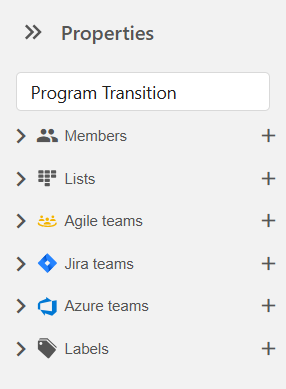
The following properties can be configured via the panel:
- Granting access to users in the Agile Program: users can be added or removed per role (Manager, Support, Reader, or Member).
- Managing the order of status lists on the Kanban board. New lists can be added directly on the Kanban board.
- Adding or removing Agile teams in this program.
- Adding or removing Jira teams in this program. Only Jira teams that are configured in the Jira connectivity app can be selected.
- Adding or removing Azure DevOps teams in this program. Only Azure DevOps teams that are configured in the Azure connectivity app can be selected.
- Adding, removing, or editing labels that can be used in this Agile Program.
Need more support?
For step-by-step instructions or troubleshooting, contact your Fortes Change Cloud administrator or consult in-app help.