History Log in the Properties Panel
You can now view the history log directly from the Properties panel of your main objects. Previously, the history was only accessible from specific locations such as Kanban cards or program items. With this update, the history link is available in a consistent location across multiple apps.
What changed
The History link has been added to the Properties section of the following items:
- Projects in the Projects App
- Portfolios in the Portfolio App
- Agile Programs in the Agile Program App
- Teams in the Teams App
This means you no longer need to navigate to different views or cards to find the history of changes. Open the Properties panel of any of these items and select the history link to see a log of all recorded changes.
How to use it
- Open the app where your item is located (for example, the Projects App).
- Select the item you want to inspect (for example, a specific project).
- Open the Properties panel.
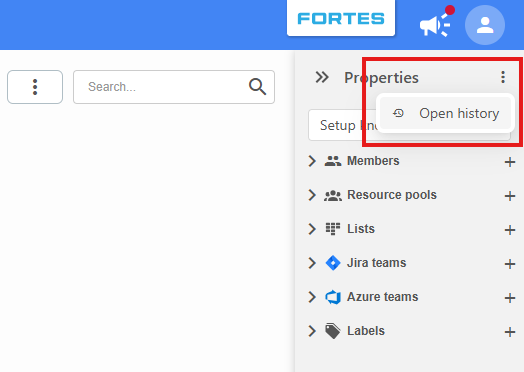
- Select the menu icon (⋮) in the Properties section.
- Choose Open history to view the change log.
Best practices
- Use the Properties panel as your go-to location for viewing history on projects, portfolios, agile programs, and teams. This is now the most consistent way to access the history log.
- Check the history log regularly to stay informed about recent changes made by team members.